Tuesday, 28 April 2015

How to Improve business Using Social Media and Increase Followers


One of the challenges that businesses face when it comes to social media marketing is how to gain more followers. How can you find people to follow your business page and most importantly how do you find people that interact with your pages and share your content?
To make this article more interesting I will not just discuss the theory of social media marketing but I will show you the results of a social media campaign we have been running for the last 10 months for an online business. I will try to explain the challenges that we had to overcome and the solutions that lead to a dramatic increase of followers on Twitter, Google+ and Facebook.
Company Profile
The company is knownhost.com, a web hosting provider offering managed VPS hosting packages to consumers since 2005.
The results
Increase in Twitter Followers
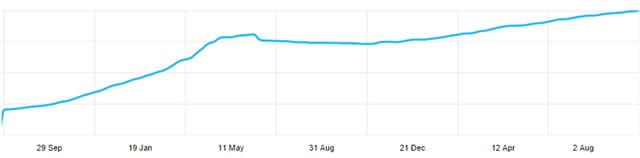
Example of how Twitter Followers increased over the last 6 months
When we started social media marketing for knownhost in November 2013 the company had:
400 followers on Facebook
480 followers on Twitter
200 followers on Google+
After 10 months (September 2014) the numbers are:
7300 followers on Facebook (1825% increase)
4018 followers on Twitter (837% increase)
900 followers on Google+ (450% increase)
The challenges
  • It was difficult to reach out to people who were not currently interested in our products (web hosting packages).
  • There is huge competition in the hosting industry
  • We needed a strategy to differentiate our company from the rest
  • We wanted more people to find out about our brand, products and services

3 Steps for a Successful social media marketing for businesses

The solution to the above challenges that lead to a dramatic increase in followers was to combine content marketing with a carefully planned social media campaign. Let’s see below the 3 steps that can almost guarantee you success.
Step 1: You need content
That may be obvious to many people: you need content to run social media campaigns, but for most businesses this is the most difficult part to achieve. The reason is that they have a lot of content about their products and services but not enough content that can be used for social media awareness.
People that use Facebook, Twitter or Google+ are less likely to follow a business page that only advertises their products and services, unless of course they are a big brand (think Apple) that sells popular products.
The solution here is to publish content on your business page that is interesting for people to read, share, comment and follow. In general, you can use content that is part of these 3 categories:
  • How-to articles
  • Industry news
  • Tips and advice
Take a look at the Google+ page to see how the above content rich categories can blend together with the products and services a company is offering. See how we share content about technology news, blogging, social media and everything that may interest our current and potential customers (bloggers, graphic designers, small business owners, webmasters etc).
Step 2: Content is not enough, you also need to promote your accounts
I know that I said above that you need content but content alone is not enough for social media success. You also need to promote your social media accounts and content.
What do we mean by promote? Don’t expect that by just creating and publishing good content on your business page people will start following you. You need to get out, spread the word and tell people about your interesting content. To be more specific:
On Facebook the best way to reach more audience is to use targeted ads. For those that are not aware, Facebook has an advertising platform which you can use to promote your business page or posts and get more likes, more website visits or more sales. What is nice about this system is that you can create targeted campaigns and get your page in front of the ‘right people’. In terms of cost, once you run a pilot campaign for a couple of weeks you will be able to predict how much budget you need to reach more audience on Facebook.
On Twitter the most efficient way to find targeted followers is to use the twitter search function and find out users tweeting about your industry, related products or competitors. Searching for hashtags instead of plain keywords can get you better results (i.e. search for ‘#socialmedia’ instead of ‘social media’). Once you find these people follow them and statistically some of them will follow you back.
You can follow the same approach for Google+ but have in mind that a business page can only follow 50 people per day so you need to follow a less aggressive approach to stay away from unwanted troubles.
Step 3: Monitor your brand and clean up your accounts
So, you have good content, you promote your accounts by advertising or reaching out to potential followers, what’s next?
The next step is to monitor what people say about your brand in the different networks and reply to any comments (either positive or negative). There are various ‘brand monitoring’ tools you can use but another easy way is to use the search function of the different networks and search for your brand name. Make sure that you do this on a daily basis and that you publish and share your replies so that other people can see that you have an active presence.
As a final step you also need to clean up your accounts on a regular basis. ‘By clean up’ I mean remove people that are not active or not related to your niche or business. On networks like Twitter it’s very difficult to find users that only tweet about your industry and niche so you need to regularly review who you follow and try to stick to people that are a better match to your customer profile.

Conclusion

Businesses can successfully use social media provided that they are willing to invest both time and money to establish their social media presence. Depending on the type of business, you can choose which networks to utilize but the recipe for success is always the same: Share useful content that goes beyond your products or services, promote your accounts, protect your brand and keep your accounts in good shape.
To go from theory to practice, take a closer look at what we have done with the knownhost case study and apply the same strategies to make your company a social business.
How businesses can gain more followers on social media (case study) by

Content In Seo And implementing Anchor Text ,Hidden Text and Keeping the content unique in seo

Page Content:

Your page content does the talking to your online business prospects. Designing the structure and ensuring the quality of this content benefits you in all parts of website optimization; from usability and conversions to on-page SEO. In terms of SEO:

HTML to TEXT ratio:

It is an SEO best practice to have more text compared to HTML on your website. The formula used to calculate it is as follows:
HTML to Text Ratio = Text Size / Web Page Size x 100
  • A value between zero to 25 percent is considered a page with code bloat. The page needs more text.
  • A value between 25 to 70 percent is considered ideal.
  • A value of more than 70 percent means there is a lot of content and search engines may consider it to be spam.

Here is a list of some free HTML to text calculator providers:


Keyword Density:

Once you have your target keywords researched and ready to be inserted in the site content you need to know how many times a particular keyword must be used in order to rank highly. It used to be that the so-called SEO gurus would advise anywhere from two to 15 percent keyword density or even more. Those days are over.
The reality in today’s world of modern search engine algorithms is that the number of keyword recurrences does not matter. What really matters is how relevant it is to the context of the content where it is used. Watch this video on keyword density from webspam head of Google, Matt Cutts.
 If you are confused follow this advice:
  • Write your content allowing the keywords to flow naturally into it.
  • Make sense grammatically when using keywords in your web page content. For instance, if your keyword is how do I improve my search rankings and you cannot place the first person reference in your content you might have to usehow to improve your search rankings within your page content. Better still you could say something like ‘if you are wondering “how do I improve my search rankings” here is….’
  • Content should be readable and must provide value.
  • You could check the keyword density of competitor sites that rank high in searches for some useful hints.


The following are some of the free keyword density checker tools:


Uniqueness:
The text in your page content must not be present elsewhere on the web i.e. it must be original and unique. Use one of the following tools to double check if your content is indeed unique:
If certain pages contain duplicate content that you cannot change, such as product pages on an e-commerce website, you must ensure that you indicate the preferred page as the original content. This must be done so that you do not end up with a duplicate content warning message in your Google Webmaster Tools.
You can indicate certain content as duplicate by adding an HTML tag calledrel=”canonical” on the duplicate pages (with the href containing the URL destination of the preferred original content).
This rule for duplicate content is true for Title tag and Description tag content as well, so ensure that the text in these tags are unique to each web page.
Hidden Text
Stay away from hidden text in your site content. Some of the hidden text tactics include matching the text with the background color, having a font size zero, including text behind images or including hidden text in CSS.
Sometimes hidden text may be placed on your website without you being aware of it. Learn how to detect hidden text on a website using the  Web Developer Toolbar.

Anchor Text:

Anchor text are the words that are hyperlinked to a destination URL (a link either to an internal or external web page). It used to be general practice to link pages or sites with exact anchor text match i.e. the same keyword would appear on both the linked pages. This was a strong signal to search engines to rank the website highly for that keyword. Since this practice has been abused a lot lately, a variety in anchor text that is not only bound to your target keywords is preferred. It gives the impression of natural internal and external linking to the search engines.
NOTE: Make sure anchor text linking with exact-match keywords within web pages is limited to 50% of your total links on the web page.
For example, if your anchor text is “designer watches,” here are some anchor text variations you can use when you link:
  • Keyword (<50%) (Designer watches).
  • Brand Name (Watchshop).
  • Page URL (Watchshop.com, www.watchshop.com).
  • Long-tail keywords/partial anchor text match (best designer watches, designer watches discounts).
  • Generic words (click here, read more).
  • Generic words + Keywords (read more about Armani Designer Watches).
  • Info Source (article, source, video, website, report).
  • H1 of the linking page (ladies designer label watches).
It is tough to keep up with the ever-growing competition in organic searches if other websites often feature above you in search results. You need to keep abreast of the changing SEO trends and start planning for a wholesome SEO strategy. Building SEO Friendly website content is a quintessential part of this strategy.


Why I Frames ,Frames ,Flash, Popups are Bad For Seo

10 Design Flaws Which Can Destroy a Site’s SEO
When it comes to creating a new website, a key dilemma is whether the focus should be on fantastic Design and User Experience (UX), or on Search Engine Optimization (SEO). There are many cases where mind-blowing animated design negatively affects the site’s SEO. Whilst you may expect an increasing number of visitors on a better designed website, in reality you may see the opposite occur. In order to be successful, any website needs to perform well in search engines.
Therefore, searching for the compromise is essential.

Most web designers likely to ignore SEO as it limits their artistic possibilities. However, there is no need to cut down on design features for the sake of optimization. Designers can work in tune with SEO specialists and developers to find a formula that would meet both users’ wishes, and search engines’ requirements.
Additionally, there is another trap that must be avoided. Pre-existing sites with good SEO may have to reconsider their efforts during a redesign. Even the smallest of changes can create design errors that will hurt its SEO.

What are these errors? Here are the most common mistakes web designers make when not taking SEO into account:

Mistake #1 – Images Instead of Important Elements
Using images as a primary form of navigation will result in search engines treating them without their functional meaning. On the other hand, pure textual navigation is not a good option either.
The compromise is to use text-over-image techniques with CSS.
On top of this, when using headers, it is also not recommended to replace text with images. Content replaced by beautiful graphics with text may look outstanding, but it will not work for SEO. Header text is intended to highlight important keywords; Replacing them with images will devaluate the content.
Speaking generally about images as website content, it’s essential to know the basics of optimizing them for search engines without sacrificing the design. You can find some useful tips on image optimization here.

Mistake #2 – Lack of Breadcrumbs
A perfectly engineered breadcrumb trail will significantly increase a site’s SEO performance. Text links are easily read by search engines and provide a transparent hierarchical navigation structure. Unfortunately, designers often forget about breadcrumbs, despite the fact that they would noticeably increase the user friendliness of the site.


A good example of breadcrumbs on gameinformer.com
Mistake #3 – A Mobile Version of the Site
As mobile devices have gained more and more popularity in recent years, it’s important to take care of the mobile version of your site. This raises concern regarding whether it’s best to create a separate mobile site, or to use responsive design. According to Matt Cutts of Google, responsive design is a smarter choice for SEO needs. When the mobile version of the site does not perform well (ie. without “rel=canonical”), you can end up with PageRank divided between two pages. This is impossible when using responsive design thanks to using just one URL.
Mistake #4 – Frames
It’s hard to believe there are still websites made with frames. Not only did they become obsolete years ago, but they also won’t act in your favor in website SEO-wise. Frame make it difficult for search engines to read your site with valuable content hidden. As framed websites use three html files instead of one, this causes conflicts with indexation.

The world’s worst website definitely uses frames
Mistake #5 – Improper 404 Page
Creating custom 404 pages is always a possibility to add extraordinary humorous ideas for web designers. But in search of some light relief, they often forget to include the necessary elements.
For example, navigation elements – a link to return to the website. Not only will it improve the user experience, but will also improve the SEO. Otherwise, search engines will find your site contains broken internal links that will reduce its search ranking.
Mistake #6 – Too Much Flash
Visually attractive Flash is still badly indexed by search engines. Surely, your website can contain Flash, but it is recommended not to use it for important content and navigation – and definitely don’t make the entire site Flash. However, it is always up to you to prioritize visual or SEO issues.


Beautiful grimoire.jp Flash design
But the good news is that unlike Flash, HTML5 is SEO-friendly and Google successfully indexes HTML 5 content. Several advantages of HTML5 for SEO are reviewed here.
Mistake #7 – Improper Video Embedding
Whilst video content is a great way to engage your audience, it doesn’t always help your SEO. Specifically, custom Java media players are not readable by search engines. The optimal way is embedding videos directly from YouTube which is owned by Google.
Mistake #8 – Pop-Ups
To begin with, pop-ups are a big no no for designers to use. They are equally badly treated by visitors and search engines. They are annoying and usually closed by most users the moment they appear. Moreover, they immediately evoke prejudice about the website. Search engines don’t even index pop-ups as a part of the site. You can always find another place to put pop-up content on your site; just forget about pop-ups altogether for your own sake.

Mistake #9 – Geo-Redirection
Multi-language sites often use automatic geo-redirection which reads a users’ location and the language of their computer to redirect towards the website with the appropriate locale. Although this is convenient, redirecting away from your home page will hurt SEO. The best way to cope with this problem is to let users manually pick their location.

Mistake #10 – Neglecting Heading Tags
Heading tags are used not only for visual emphasis of content, but have a considerable impact on SEO as well. Saying that search engines like H1 tags means that Google gives them a higher importance. The proper use of H tags includes putting keywords into H1 tag and not using it for a company name or styling purposes.
Generally, all of the mistakes mentioned above are the result of one major mistake which is to consider SEO after designing a website. SEO must be treated as one of the components of a design. A designer can create perfect artwork, but it’ll be absolutely worthless if nobody can find it.

Image:

Text present within images does no good for SEO. If you want your website’s images to be search engine optimized, you need to include a description of the image in the alt text attribute of the image’s HTML, as shown below:
<img src="gaint-prawn.jpg"alt="the gaint pravn at balina">
An Example of the Use of Alt Tags for Images
The following are some important points to note for SEO-friendly images:
  • You must include text that is related to the content around it. For example, if you have an image of a formally dressed and well-groomed woman and your site talks about ‘young entrepreneurs,’ describe the image as young entrepreneurs of today and not as smart looking young woman.
  • If the image is used for bullet lists or any other decorative purposes you can leave the alt attribute empty i.e. alt=“ “
  • If you have images of decorative text, add the same text in the alt attribute.
  • Keep the alt text content short and descriptive
  • For logos, describe the image as ‘Company Name.’
  • Use relevant keywords in context with the content on the page where it is displayed.
  • Choose an appropriate file name for the images. Avoid hyphens or underscores.
  • Label the file extension, for instance, “.jpg” (JPEG) so that search engines know it is a photo or “.gif” (GIF) so that search engines know it is a graphic.
  • If you have a really long description to add to your site’s visuals, learn more about the longdescattribute here.


Tuesday, 24 March 2015

The Growth Of Direct Answers: How Should SEOs React?

More and more often, SERPs are including answers, not just links to answers. Columnist Mark Traphagen recaps an SMX West panel that explores the effects.


answers-signs-ss-1920 
Remember that annoying student when you were in school? The one who sat in the front row and raised his hand for every question before you could?
In the eyes of many site owners, Google has become that student.
For an increasing number of search queries requesting factual information Google (and to a lesser extent, Bing) is returning answers at the top of search results pages that (usually) don’t require any click-through by the searcher.
This could be seen as a serious threat to sites that have been accustomed to getting organic search traffic by providing that kind of information. In fact, SEO Glenn Gabe documented a dramatic drop in traffic for several song lyrics sites after Google started displaying lyrics as a direct answer.
However, other webmasters see Google’s direct answers in search as a new opportunity to get a jump on the competition and become featured for free by Google.
At this year’s SMX West conference in San Jose, three experts who have been keeping a very close eye on developments with Google’s direct answers reported their findings and provided advice as to what site owners can do to take best advantage of a search feature that will only continue to grow in its influence.
This post will give you the main ideas and takeaways from each of their talks. You will also find an embed of each speaker’s slide deck so you can get further detail and see their examples.

The panel:

Eric Enge, CEO of Stone Temple Consulting @stonetemple (full disclosure: my employer)
Bill Slawski, Director of Search Marketing for Go Fish Digital,  @bill_slawski
Ehren Reilly, Director of Product, Growth at Glassdoor,  @ehrenreilly
Eric Enge revealed findings from a recent study he conducted, while Bill Slawski provided a deep dive into possible sources for Google’s direct answers. Finally, Erhren Reilly shared some ways his company has been using direct answers to their advantage.

What’s New With Direct Answers In Search By Eric Enge

Eric Enge SMX West 2015
Eric Enge shared the results from a recent Stone Temple Consulting study that submitted over 850,000 questions to Google and Bing search to see how many yielded direct answers.
Direct answers or “rich answers” are a special result at the top of the first search results page that provides a brief answer to a question query that (in most cases) does not require a click through to a web site.
The questions were generated as follows:
  • 250,000 each came from Google’s and Bing’s auto suggest features
  • The rest were generated via brainstorming by the Stone Temple research team
For the latter set of question, the team compiled a huge list of persons, places, and things, and then generated various questions a real person might want to know about those things. For example, for “Eiffel Tower” questions used might include “when was the Eiffel Tower built?” and “where is the Eiffel Tower located?”
Their finding: Google returned direct answers 19.4% of the time. Bing provided them for 1.1% of the queries used.
Enge remarked that they saw a great variety of answer types, including tabbed menus and movie times.
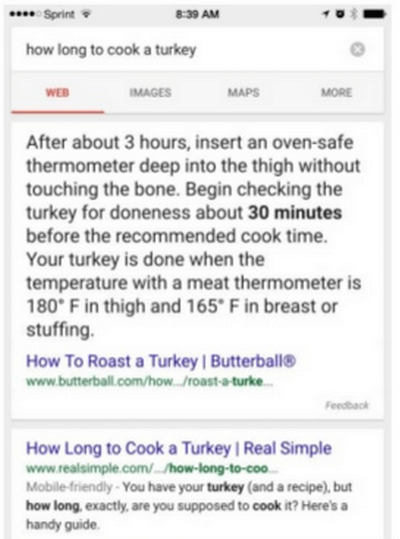
He reported that in over 3000 cases, the direct answer was incomplete, with an ellipsis that links to the originating site. For example:
Google direct answer partial answer
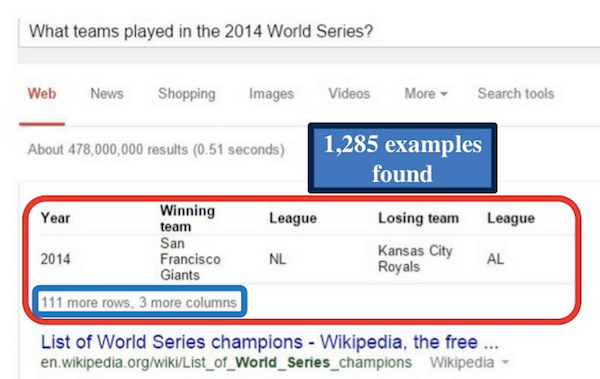
Over 1000 were in the form of a table, such as this one for World Series Winners:
Google direct answers table display
Other types of rich answer boxes found in the study included:
  • Linked tables (or “sliders”) – 6,740 results: search Google for “what time zone is Russia?” on a desktop browser and click one of the displayed time zones. Notice that a knowledge panel for that time zone opens in the right sidebar.
  • List or step-by-step – 1,871 results: Search Google for “okra boiled” and you get a three-step recipe. By the way,  all of the observed examples of this type linked to a third-party source. In many of these some of the steps themselves were incomplete, with a linked ellipsis, or a “more items” link at the bottom.
  • Rich answer box plus a sidebar knowledge panel – 45,132 results: Search Google for “who is Rin Tin Tin?”
  • A form – 5,356 results: Try “how many calories in a pepperoni pizza” or “mortgage calculator.”
  • Charts – 33 results: Try “GDP of the USA.”
  • Carousel – 4,284 results: Try “roster for the boston red sox.”
  • Link to follow on actions – 172 results: These rich answer boxes included a direct link to a resource, such as an app download. Try searching “youtube account maker.”
  • Image in result – 36,392 results: Try “when will Jupiter Ascending be released?”
  • Related items shown: These results include a bar with thumbnail image links to searches that are related to the current search. For an example, try searching “capacity of allstate arena.”
Enge said about 75% of the direct answer boxes viewed in the study included attribution links to the original source. Example of types that didn’t included song lyrics and public domain info (such as “What is the capital of Washington state?”). A Google representative told Eric that Google only shows song lyrics for songs for which they have obtained proper rights.
Enge concluded with some thoughts about the potential impact of these direct answers on publishers:
  • Don’t try to make a living on public domain info
  • Even licensed info is vulnerable (e.g., song lyrics)
  • Could be good if your site is selected for a partial answer with a link, which might actually drive traffic to your site
Eric Enge’s slide deck for this presentation:

The Growth of Direct Answers: How Should SEOs Evolve? By Bill Slawski

Bill Slawski SMX West 2015
Are query results better if Google provides a direct answer in addition to the regular results? Bill Slawski opened with this question. He noted that providing direct answers was listed as a positive in Google’s Q4 earning statement.
Google claimed that providing such answers “makes it quicker, easier, and more natural to find what you’re looking for.” Google Chairman Eric Schmidt, in “We Built Google for users, Not Websites,” stated that Google would be providing more or these direct answers because “it’s quicker and less hassle than the ten blue links” Google has traditionally shown.
Slawski also referenced a patent filed by Google Israel last year, titled “Natural Language Search Results for Intent Queries.” He found it interesting how the patent authors determined authoritative sources. In particular they cited as authoritative pages which:
  • were frequently selected in search results
  • consistently rank high in search results for related topics
The Israeli researchers built templates with different forms of the same question. They then looked for pages that consistently rank higher for all those forms. High ranking pages were put into a data store, listed by headings (such as “What are the symptoms of Mono?”) and answers (the concise list of symptoms).
What are the potential benefits of having your content appear as a direct answer? Slawski listed three:
  • Additional chance to be seen in search.
  • Opportunity to be seen as authoritative (since Google picked you as the best answer).
  • The different formatting of the answer box compared to the rest of the results is sure to bring more eyes to the result.
Slawski drew from another Google research paper to come up with some possible sources for authoritative answers:
  • Tabular data (example: a Wikipedia info box alongside a Wiki article)
  • Relational tables that display related data in tabular format (such as a list of U.S. Presidents and basic facts about each)
  • Colon-delimited pairs (such as “Check In Time: 3:00 PM; Check Out Time: 12 Noon” for a hotel)
  • Structured snippets
  • Knowledge bases
  • Query stream data merged with knowledge bases and web documents (Biperpedia)
Some facts are just in the Knowledge Graph and need no attribution (“How old is Barack Obama?”), while others come from specific sources.
In some cases, it appears Google may actually reach out directly to trusted sources to gain information. For example, Google recently announced a partnership with reliable health sources such as the Mayo Clinic to obtain answers from real human experts, which are now being passed along for selected health-related queries as direct answers.
Bill Slawski’s slide deck for this presentation:

Winning With Direct Answers As A Content Site By Ehren Reilly

Ehren Reilly SMX West 2015
Reilly began by allaying fears site owners might have about publishing question-answer type content, namely that such content is “thin” and therefore could bring on a Panda penalty. But Reilly claimed that Panda is not really about thin content, at last not in the sense of the length of the content. Panda, he said, is more about quality. So content can be high quality but bite-sized.
However, many sites have tried to drive traffic by merely providing quick question-and-answer type information. That alone won’t work so well anymore. Google realized people want such info as quickly as possible, so why make them click through to a site for it?
So as more and more of those questions get answered by Google direct answer boxes, it is no longer a viable business model just to supply high quality but bite-sized information. Sites like isitraining.org or whatsmyipaddress.org are becoming superfluous.
Another endangered species, according to Reilly, is what he called “high quality, non-proprietary content.” This is content that is highly valued by searchers, but is either public domain information or easily-obtained licensed information. He gave examples of song lyrics, information available in Wikipedia or other public knowledge bases, or simple facts already in Google’s Knowledge Graph.
Sometimes Google even provides answers directly in the query box auto suggestions!
Direct answer in Google search auto suggestions.
But what if you have high quality, proprietary content? Is that safe from Google’s direct answers?
Even that type of content can be threatened by direct answers. Google may show what Reilly called “spoiler alert” results.
Spoiler alert direct answer example
In the example above, Google grabs one fact snippet out of a much longer piece (a complete recipe) to answer a question.
The above examples make many publishers feel like Google is stealing their content. But according to Reilly, Google’s response would be that they are just doing what’s best for the user.
So what can publishers do?
Reilly said you should consider that getting your content in a direct answer box is good branding. The top organic result isn’t always the one shown in the direct answer box, so earning that place could be considered a win for a lower-ranking site.
Reilly provided an example of such a win achieved by his company, Glassdoor. They publish salary info for various jobs, which started showing up in direct answers. The problem was that while the information was theirs, from a report that took a large investment to produce, Google was showing in the answer box data and attributions from other publishers writing about their report.
They analyzed their page in comparison to those that were getting the answer box, and determined that the other publishers had a sentence that clearly and directly answered the questions, while theirs didn’t. They altered their page to include such sentences, and very quickly they began showing up in the answer boxes.
Takeaway: Make sure you have clear, natural language in your articles that directly answers the most likely questions about any factual information.
Reilly shared another benefit they discovered: when you get in an answer box, your regular result gets a fatter snippet with the same answer text. You get more search results real estate.
Mega snippet resulting from direct answer box.
Every direct answer follows a formula. If you look carefully at the pages that get into direct answers for information your site provides, you’ll see the pattern. Find it for your pages and structure your content accordingly.
What about clicks? Webmasters are concerned about whether direct answer boxes result in click-throughs to their sites.
The classic search problem was getting more clicks than your competitors. But now it is more like getting a click vs. no click at all!
Some direct answers entice clicks better than others. For example, a list or step-by-step answer box which has abbreviated steps with an ellipsis link at the end, or an incomplete set of instructions with a “more info” link.
How do you earn those? Create large or exhaustive lists that Google can’t fit completely in an answer box.
Another trick Reilly shared is to provide teaser text right after your direct answer that hints there is more the reader would want to know. Chances are that text will get included in the direct answer, thereby enticing a click through.
What about rank tracking? Be aware that if there are direct answers, your ranking results may be thrown off. Some rank tracking software doesn’t handle direct answers well, counting them as one of the organic results, or even as the top several.
Reilly cautioned that we should expect flux. Direct answers are still new. Google is constantly testing new formats, and there are errors to be fixed.
If you’re a publisher, get over your frustration and see this as a new opportunity.
Ehren Reilly’s slide deck from his presentation:

Some Tidbits From The Q&A

  • For Glassdoor, being in direct answers proved to be more beneficial than being #1 in regular result under a direct answer that used someone else’s site.
  • Enge noted that Google seems to respond more often with a direct answer when you make a voice query as opposed to a typed query on mobile.
  • Reilly said that direct answers give new life to FAQs. You can now rank for an individual answer on an FAQ page.
  • Danny Sullivan noted that even searching “Zillow mortgage calculator” now returns the Google mortgage calculator. So even branding your generic info is not an advantage. However, he said that we should remember that after Yelp complained loudly when Google showed Google reviews even when queries specified Yelp reviews, the Google reviews for such queries disappeared after the Pigeon update. So it may be possible for powerful brands to reclaim their branded info-content.